HUB 01 · Multicookers
What Do the Instant Pot Buttons Mean?
A wall of buttons is the most intimidating thing about a new Instant Pot — and the reassuring secret is that most of them do the same thing at different preset times. Here is what each group of buttons actually does, which ones you will genuinely use, and why you can ignore most of the rest.
We earn a commission if you buy through our links. It does not change the price you pay, and it does not decide our picks — the scoring rubric is published in full, including what disqualifies a pick. How this works.
The reassuring secret first
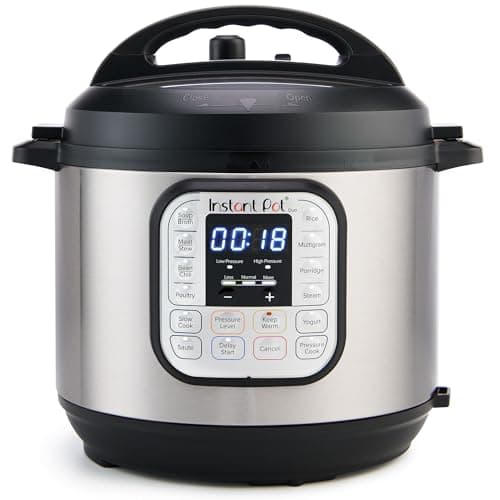
A new Instant Pot arrives covered in buttons — Soup, Meat/Stew, Bean/Chili, Rice, Poultry, and a dozen more — and it looks like you need to learn a dozen different machines. You do not. Here is the secret that makes the whole panel click: most of those preset buttons do the exact same thing — pressure cook — just at a different preset time.“Soup” is pressure cooking for a soup-ish number of minutes; “Bean/Chili” is pressure cooking for a longer, bean-ish number of minutes. They are shortcuts, not separate functions, and you can ignore almost all of them and still use the machine to its full potential. Once you see the panel that way, an Instant Pot stops being intimidating. If you are brand new to the whole idea, pair this with how to use a pressure cooker.
The one button that matters most: Manual / Pressure Cook
The button to actually learn is the one labeled Manual on older models or Pressure Cook on newer ones. This is plain pressure cooking with a time you set, and it does everything the preset buttons do and more, because you are in control of the number of minutes rather than trusting a factory guess. Press it, then use the + and − buttons to dial in the cook time from a recipe, and press Pressure Level if you want to switch between High and Low pressure (High is the default and what nearly every recipe means). That is the core loop of the whole machine: Pressure Cook, set the time, choose the level, done. Master that one button and the entire wall of presets becomes optional — the number you set is the cook phase only, which is why timing works the way it does in Instant Pot cooking times.
The buttons that genuinely do something different
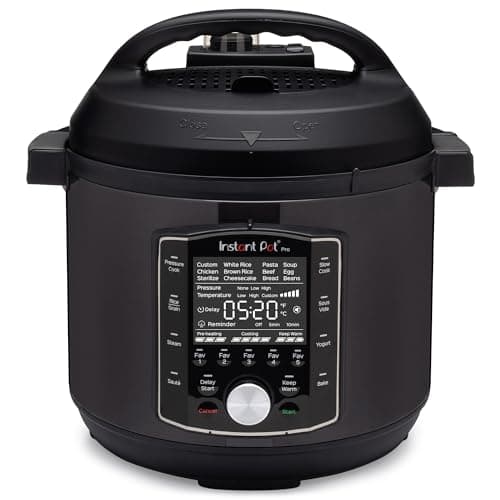
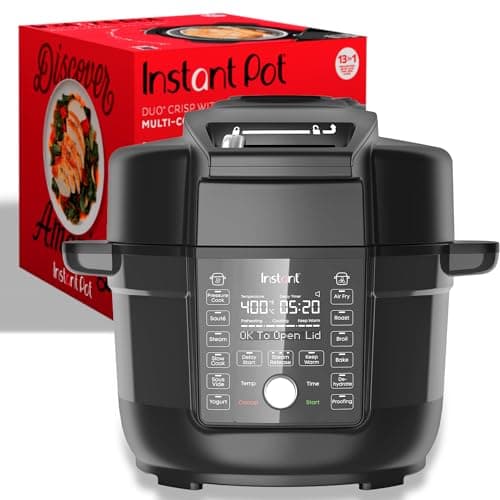
A handful of buttons are not just preset pressure times, and these are worth knowing because they change what the machine is doing. Sauté heats the open pot with no lid pressure, so you can brown meat and soften onions right in the pot before you pressure-cook — the step that adds a lot of flavor, and the one a plain slow cooker cannot do. Slow Cook turns the Instant Pot into a slow cooker, holding a low heat for hours (with one quirk we cover in can you slow cook in an Instant Pot). Keep Warm holds finished food at a safe serving temperature and often switches on automatically after a cook. On more capable models you will also see genuinely distinct functions like Sous Vide on the Pro, or Air Fry, Bake and Dehydrate on the Duo Crisp with its Ultimate Lid. Those are real modes, not relabeled pressure presets.
The settings around the edges
A few more controls round out the panel. Adjust or the Less / Normal / Moresettings change the intensity or time of whatever function you have selected — More for a hotter sauté or a longer preset, Less for a gentler one. Delay Start (or Timer) postpones the start of the cook by a set number of hours, so you can load the pot in the morning for a slow cook that begins later — useful for slow cooking, less so for pressure cooking raw meat that would sit out. And the Cancel / Off button ends whatever the pot is doing and is your reset. None of these is complicated, but they are the ones people miss because the flashy preset buttons draw the eye.
The one that is not a button: the steam-release valve
The most important control on the whole machine is not on the button panel at all — it is the steam-release valve on the lid, the toggle you set to Sealing to build pressure or Venting to release it. Getting this wrong is the single most common first-week mistake: leave it on Venting and the pot never comes to pressure and never cooks. It is such a common error that the premium models fix it with an auto-sealing lid (a real reason to consider the Pro over the Duo). Knowing that valve — and the difference between letting it release on its own and flipping it to vent, which is natural vs quick release — matters more than memorizing any preset button. If the pot will not pressurize, the valve is the first thing to check, along with the other fixes in Instant Pot not sealing.
What to actually learn:Pressure Cook (or Manual) plus the +/− time buttons and Pressure Level for cooking; Sauté for browning; Slow Cook and Keep Warm for the obvious jobs; and the Sealing/Venting valve on the lid. Everything else on the panel is a preset pressure time you can safely ignore. Learn those few and you have the whole machine.
The hardware
The cookers this page is about
The cookers referred to above, with prices pulled live from Amazon and dated on every card. Full rankings live in the roundups linked from this page.
1,000 W
Instant Pot Duo 7-in-1 Electric Pressure Cooker, 6 Quart
The multicooker that made the category, and still the right default. Instant Brands publishes the wattage, the working pressure range and a stainless (not nonstick) inner pot, which is more than most of the field manages — and it costs less than almost all of them.
1,200 W
Instant Pot Pro 10-in-1 Pressure Cooker, 6 Quart
The Duo's mechanicals with the interface fixed: a genuine sous vide program, an auto-sealing lid, grab-and-go pot handles and five programmable buttons. It draws 1,200 W rather than the Duo's 1,000, and Instant Brands does not publish a working-pressure figure for it — the one gap in an otherwise well-documented cooker.
1,500 W
Instant Pot Duo Crisp Ultimate Lid, 13-in-1 Air Fryer & Pressure Cooker, 6.5 Quart
The one lid that both pressurizes and crisps, which is the whole argument against buying a pressure cooker and an air fryer separately. It draws 1,500 W — the most of any Instant Pot here — and that higher draw is the air-fry element doing real work, not a spec-sheet flourish.
#ad · As an Amazon Associate we earn from qualifying purchases.
Questions
Frequently asked
Do the Instant Pot preset buttons do different things?
What is the difference between Manual and Pressure Cook?
Which Instant Pot buttons actually matter?
Keep reading
Related
Receipts
Sources
We have not tested these machines in a lab and we do not pretend to have. Specifications come from the manufacturer's own published documents; electricity rates come from the US Energy Information Administration; prices come from the live Amazon API. Where a figure is not published, the page says “not published” rather than guessing. Read the full method.